Find the hours between $10K and $50K a month.
OwnMins splits every work session into productive, neutral and procrastination minutes, app by app and site by site. You see exactly where your billable day went, and you take it back.
macOS 14 Sonoma or later · No card for the trial · Activity data stays on your Mac
Halvorsen · checkout redesign
Tracking
Now · Figma
Checkout flow · v3
- Productive
- 36m 17s
- Procrast.
- 6m 00s
- Neutral
- 3m 35s
Earned at $120/h
$72.57
Leaked
$12.00
The math
What does a lost minute cost you?
Freelance income is your rate times the hours you really work. Put in your own numbers and see what distraction takes out of every month.
Assumes 21 workdays a month. Nothing you enter leaves this page.
Your effective rate
$83/h
Lost to distraction every month
$1,313
That is $15,750 a year, or 15.8 billable hours every month.
At $83/h, $20,000 a month takes 240 billable hours. Your 45 lost minutes a day are 15.8 of them, already inside your workday. That is more than most people can bill, so your rate has to rise too. OwnMins reports show what each project really took, which is the evidence a higher quote needs.
OwnMins costs $29 once, about 21 minutes of your time.
$10K → $50K a month
What changes on the way to $50K a month
Freelancers who scale past $20K rarely work twice the hours. They know which hours earn, and they guard them.
$10K/mo
You sell hours.
Most of your week is client work, but you can't say how much. Mornings slip into inboxes and feeds, and your evenings pay for it.
OwnMins shows the real split for the first time, by app and by site.
$20K/mo
You protect hours.
You know which sites pull you away and at what time of day. You set rules for them and keep the session timer in sight.
Rules by app, domain, page prefix or exact page, plus a timer in the notch.
$50K+/mo
You price with evidence.
You know what each kind of work really takes in focused time. Your quotes stop being guesses, and they go up.
Daily and weekly reports, full session history and CSV export.
How it works
Press start. Work. See the day.
- 1
Start a session
Name it after the client or the task and press Start, from the app window, the menu bar or the notch. Nothing is recorded outside a session.
- 2
Work the way you already do
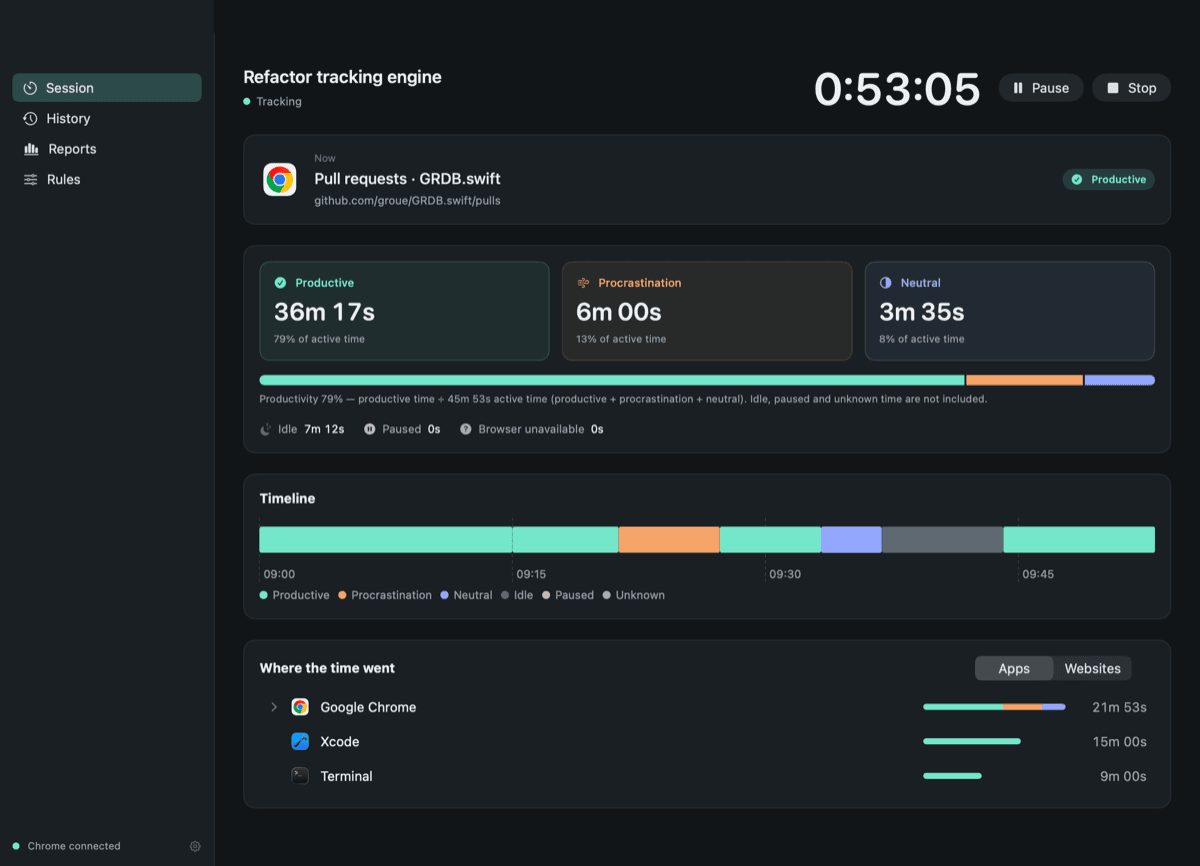
OwnMins sorts each app and Chrome tab into productive, neutral or procrastination using your rules. Step away from the keyboard and the idle cut-off stops the count.
- 3
See where the time went
Stop the session for totals, a minute-by-minute timeline and the apps and sites behind every number. Daily and weekly reports add it all up.
Details
Numbers you can bill against
A tracker is only useful if you trust it. OwnMins accounts for every second of a session, and it never guesses against you.
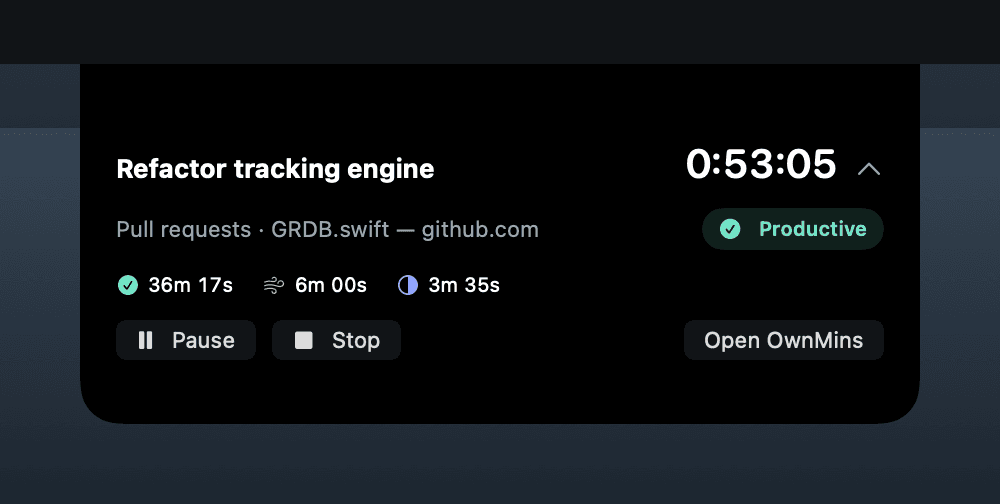
Your timer lives in the notch
Hover the notch to see the session, the page you're on and its category. Pause or stop without opening a window.
You decide what counts
Set rules by app, domain, page prefix or one exact page. YouTube tutorials can count as work while YouTube Shorts doesn't.
- XcodeProductive
- youtube.comProductive
- youtube.com/shortsProcrastination
- MailNeutral
- x.comProcrastination
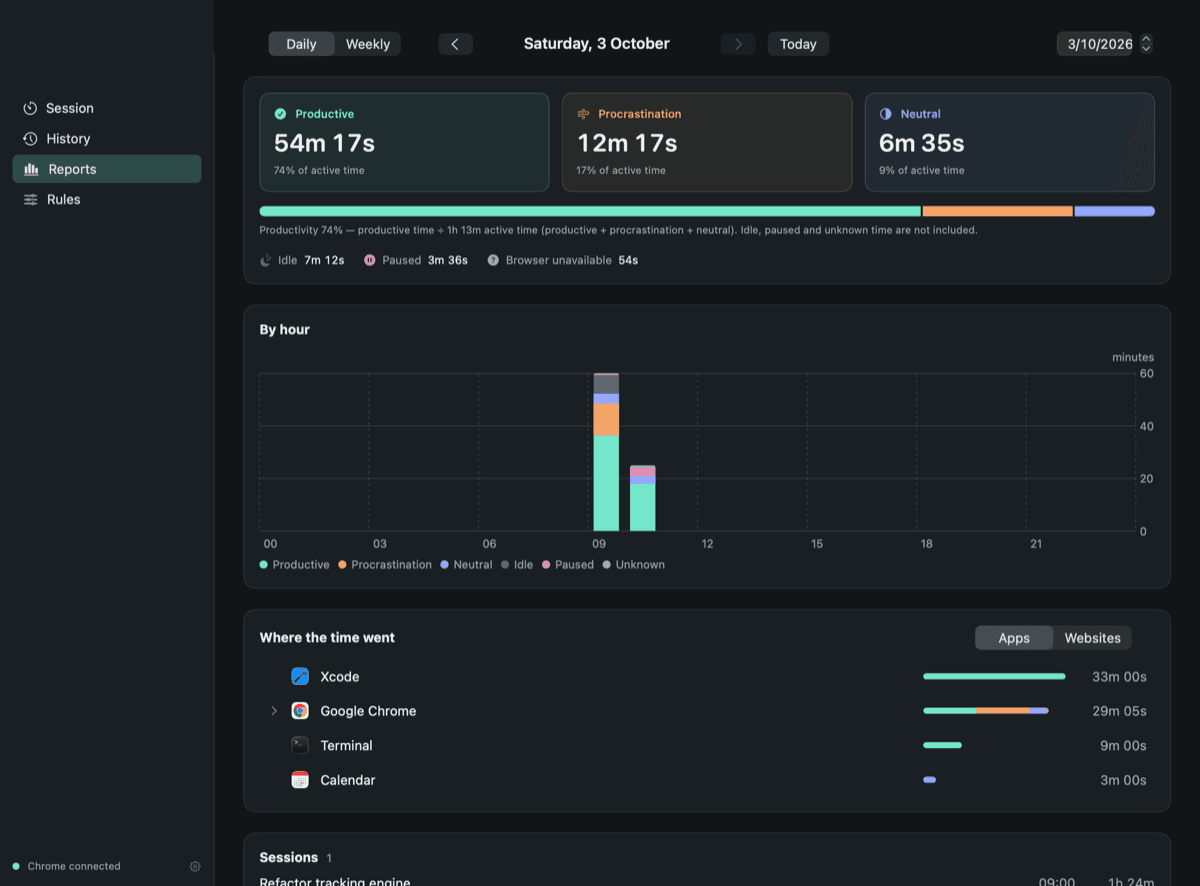
Reports by day and by week
An hourly chart, app and site rankings and every past session, so you can see which hours of your day earn the most.
Every second is accounted for
Productive, neutral, procrastination, idle, paused and unknown time always add up to the session length. Checkpoints every 15 seconds survive a crash.
Unclear time stays unclear
If Chrome's active tab can't be read, that time shows as unknown. It's never counted as procrastination.
Export to CSV
Put real hours on a timesheet or an invoice. Exports are protected against spreadsheet formula injection.
Privacy
Your minutes stay on your Mac
Your client work is nobody else's business. OwnMins keeps its activity database on your Mac and sends our licensing server only what a trial, purchase or activation needs.
Saved on your Mac, during a session
- App names
- Page addresses, without query strings or fragments
- Page titles
- Timestamps
Never recorded
- Page contents
- Keystrokes
- Screenshots
- Incognito windows
- Anything outside a session you started
Pricing
Pay once. Keep it.
Try every feature free for 7 days without a card. When you're ready, buy from inside the app. A license is one payment, with no subscription to cancel.
Introductory price
$29one time · later $39
- Productive, neutral and procrastination tracking for apps and Chrome
- Notch panel, menu bar and window controls
- Daily and weekly reports, session history and CSV export
- Works on 2 Macs, fully offline after activation
- Every 1.x update
Buy at $29 and you never owe the difference later.
FAQ
Questions freelancers ask first
Which browsers does OwnMins track page by page?
Google Chrome, through the free OwnMins extension. It reads only the active tab of the focused window. Other browsers still show up as apps, so you see the time spent in them without page detail.
Does it record my screen or my keystrokes?
No. While a session runs, OwnMins saves app names, page addresses without query strings, page titles and timestamps in a database on your Mac. Incognito windows and anything outside a session are never recorded.
What if I walk away and forget to pause?
The idle cut-off converts time without keyboard or mouse input into idle time, going back to when you left. Sleep, screen lock and switching users are handled too.
Can I use it to bill clients?
Name each session after the client or task. Reports break the time down by app and site, and you can export any of it to CSV for a timesheet or invoice.
Is it a subscription?
No. You pay $29 once at the introductory price (later $39) and get every 1.x update. A license works on 2 Macs and keeps working offline.
What happens when the free trial ends?
After 7 days you can't start new sessions until you buy. Your history, reports, CSV export and settings stay available, and no data is deleted.
Which Macs does it run on?
Any Mac running macOS 14 Sonoma or later, on Apple silicon or Intel.
Your next $10K starts with your next session.
Install OwnMins, start a session and see your real split before lunch. The first 7 days are free.